Showing posts with label player. Show all posts
Showing posts with label player. Show all posts
Friday, December 9, 2016
Convert Resize and Cut Videos with VLC Media Player
Convert Resize and Cut Videos with VLC Media Player
VLC, the free and open source media player is great at playing media of even the most obscure formats. However, that is not all it can do. It can be used to easily convert videos from one format to other. Converting videos with VLC media player is pretty fast and is in the league of most premium video converters in terms of quality. It can also be used to resize videos from one size to other for when you need to shrink videos to fit in your mobile devices. It can also serve as a quick video cutting tool.

To convert videos with VLC media player, follow the steps given below:-
1) Open VLC media player.
2) Click on Media in the Menu bar.
3) In the dropdown menu, click on Convert/Save. Alternatively, you can press Ctrl+R to directly reach media options.
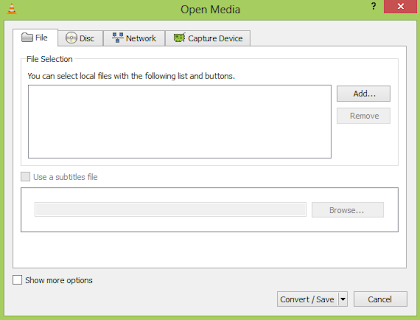
4) Click on the Add button on the right of the File selection box to load the video whose format you want to change.
5) In the following dialog box, click on browse to select the destination where your converted video will be.
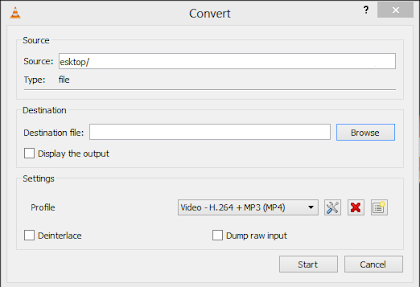
6) In the profile selection option, select from a pre-configured profile of the output or customize it by clicking on the Settings icon on its right. You can select from a range of encapsulation, video and audio formats in the following dialog box if you wish to customize the output.
7) Click on Start to begin conversion.
8) VLCs progress bar will show progress. Do not close the player when it is converting videos as it will result in output video getting corrupted.
The speed with which VLC converts videos depends upon your computers specifications. A faster computer converts faster while slower PCs take a lot of time. At the end of the conversion process, you will get the video in the format that you have selected in step 6.
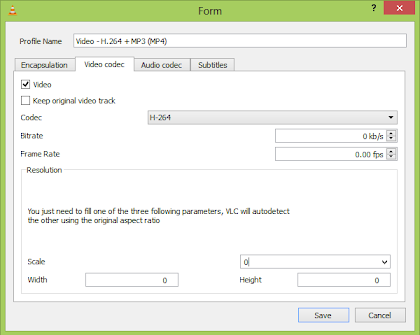
Resizing the video involves making minor changes in the steps followed in conversion. While customizing the profile in step 6, go to the Video codec tab. Inside the Scale option, enter the desired width and height that you deem fit for your needs. After that, just convert the video as you normally would. This would result in the output video having the same dimensions that you specified. However, it is important to note that exact dimensions would only be achieved if the aspect ratio of the video is maintained. If the correct aspect ratio is not satisfied by your dimensions, VLC will take one of your dimension and change the other to satisfy it.
To crop videos with VLC media player, go to the menu bar and click on View menu. Inside it, check Advanced Controls. This will result in a few extra buttons over the normal toolbar. Play the video of your choice and press the record button (from the newly added buttons) at the point in the video from where you want to start. Then, again press this button when the video reaches the point at which you want to stop it. The cut video will automatically be saved in your Videos library. It is located at Libraries/Videos in Windows 8.1, Windows 8, Windows 7 and Windows Vista. In Windows XP, it is located at My DocumentsMy Videos. You can use the Frame by Frame button to get a high degree of accuracy. You need to install the newer versions of this program as older versions do not support this.
Convert Videos with VLC Media Player
To convert videos with VLC media player, follow the steps given below:-
1) Open VLC media player.
2) Click on Media in the Menu bar.
3) In the dropdown menu, click on Convert/Save. Alternatively, you can press Ctrl+R to directly reach media options.
4) Click on the Add button on the right of the File selection box to load the video whose format you want to change.
5) In the following dialog box, click on browse to select the destination where your converted video will be.
6) In the profile selection option, select from a pre-configured profile of the output or customize it by clicking on the Settings icon on its right. You can select from a range of encapsulation, video and audio formats in the following dialog box if you wish to customize the output.
7) Click on Start to begin conversion.
8) VLCs progress bar will show progress. Do not close the player when it is converting videos as it will result in output video getting corrupted.
The speed with which VLC converts videos depends upon your computers specifications. A faster computer converts faster while slower PCs take a lot of time. At the end of the conversion process, you will get the video in the format that you have selected in step 6.
Resize and shrink videos with VLC media player
Resizing the video involves making minor changes in the steps followed in conversion. While customizing the profile in step 6, go to the Video codec tab. Inside the Scale option, enter the desired width and height that you deem fit for your needs. After that, just convert the video as you normally would. This would result in the output video having the same dimensions that you specified. However, it is important to note that exact dimensions would only be achieved if the aspect ratio of the video is maintained. If the correct aspect ratio is not satisfied by your dimensions, VLC will take one of your dimension and change the other to satisfy it.
Cut videos with VLC media player
To crop videos with VLC media player, go to the menu bar and click on View menu. Inside it, check Advanced Controls. This will result in a few extra buttons over the normal toolbar. Play the video of your choice and press the record button (from the newly added buttons) at the point in the video from where you want to start. Then, again press this button when the video reaches the point at which you want to stop it. The cut video will automatically be saved in your Videos library. It is located at Libraries/Videos in Windows 8.1, Windows 8, Windows 7 and Windows Vista. In Windows XP, it is located at My DocumentsMy Videos. You can use the Frame by Frame button to get a high degree of accuracy. You need to install the newer versions of this program as older versions do not support this.
Available link for download

Saturday, November 19, 2016
Convert any Video to ASCII using VLC Media Player
Convert any Video to ASCII using VLC Media Player
VLC is a video player with a lot of tricks. While you definitely would be aware about converting videos with it, the feature of converting any video to ASCII is one that is slightly less known. As ASCII version of movies like Star wars are very popular online, I think this feature of this amazing media player can be used to have lots of fun.
All you need to do is open any video and VLC will automatically display its converted form. To convert any video in ASCII, just follow the steps given below:-
1) Open VLC Media Player.
2) Click on the Tools menu and in the drop down list, click on Preferences at the bottom of the list.
3) Click on Video icon in the left sidebar.
4) Click on the drop down box next to Output.
5) Select "Color ASCII art video output" from the drop down list.
6) Click Save and restart VLC.
Older versions of VLC might require you to modify these settings under the Advance tab or All Settings tab. As VLC runs on a variety of OSs, this trick will work on any PC capable of running this media player. However, it is interesting to point out that older PCs having poor hardware will slow down and give a stuttered output.
 |
| An example of a video in ASCII form |
All you need to do is open any video and VLC will automatically display its converted form. To convert any video in ASCII, just follow the steps given below:-
1) Open VLC Media Player.
2) Click on the Tools menu and in the drop down list, click on Preferences at the bottom of the list.
3) Click on Video icon in the left sidebar.
4) Click on the drop down box next to Output.
5) Select "Color ASCII art video output" from the drop down list.
6) Click Save and restart VLC.
Older versions of VLC might require you to modify these settings under the Advance tab or All Settings tab. As VLC runs on a variety of OSs, this trick will work on any PC capable of running this media player. However, it is interesting to point out that older PCs having poor hardware will slow down and give a stuttered output.
Available link for download
Tuesday, November 8, 2016
Cross DJ Mix your music v1 4 6 Apk Android Audio Player
Cross DJ Mix your music v1 4 6 Apk Android Audio Player

Cross DJ - Mix your music v1.4.6 Apk Android Audio Player
About:
The best pro DJ app on Android. Mix tracks in perfect sync on a powerful audio engine. Engineered by Mixvibes, digital DJing pioneer for 15 years.
"An impressive app" The Guardian
“Challenging our notions of what can be done on a touchscreen” Android Police
"Good looks, great sounding FX, great sync engine, ‘slip’ mode, proper loops and cues." DJ TechTools
<=>MIX IN PERFECT SYNC:
FULL VERSION, ALL FX INCLUDED - NO ADDITIONAL PURCHASES, NO POP-UPS
"An impressive app" The Guardian
“Challenging our notions of what can be done on a touchscreen” Android Police
"Good looks, great sounding FX, great sync engine, ‘slip’ mode, proper loops and cues." DJ TechTools
<=>MIX IN PERFECT SYNC:
- Accurate BPM detection of your music, down to the last decimal.
- Stable Sync: one-press, and the 2 tracks never go out of phase.
- Split Mono: Pre-listen your music tracks before mixing them.
- Progressive, manual pitch bend.
- Customizable, manual pitch range (4, 8, 16, 32, 100%).
- Accurate Beat-grid editing: make any track sync properly.
- Parallel waveforms mode to visually check if your tracks are synced.
- New Quantize feature : hot cues and loops are automatically set on the beat.
- Smart-seek: Tap on the waveform to fast-forward & get a seamless jump.
- Automix: Let Cross DJ mix your tracks and play music automatically, from any sources (playlist, album, etc.).
- External mixer: control EQs and crossfader with hardware mixers.
<=>OUTSTANDING AUDIO PERFORMANCE:
- Best mix performance for an Android DJ app.
- Low latency: music reacts instantly to your actions.
- Extremely realistic scratch sound as on real turntables.
- 15 effects (Bi-filter, Low-pass, Hi-Pass, Delay, Echo, Phaser, Flanger, Cut, Crush, Bliss, Brake, Roll, etc.).
- Keylock mode: change BPM without affecting the tone.
- No load time when starting-up the app.
- Autogain: automatically equalizes the levels of 2 tracks.SoundCloud integration: Play streamed tracks in seconds.
<=>INTUITIVE INTERFACE:
- 2 turntables, full-fledged 3-band EQ mixer - with DJM EQ preset.
- Sampler: 12 sample banks + possibility to record your own samples.
- Large buttons, optimized for small screens.
- Crossfader with 3 modes: cut, autofade, normal.
- This music player is compatible with MP3s, AAC, FLAC and more.
- Multiple sorting options: Sort your library by title, artist, album, BPM or length.
- History pane: display previously mixed tracks.
- Navigation by folder.
- Adjust the tempo by moving the turntable forward / backward.
- Large control pads: XY effect pad, 16 hot-cues pads.
- HQ live recording of your mixes.
- Display remaining time of your tracks.
- Optimized for mobile & tablet.
- Mix Soundcloud : Explore, play and mix all SoundCloud. No premium account needed.
- Optimized for Intel processors.
<=>WHAT IN ADDED NEW:
- Unlimited Music: Explore, play and mix all SoundCloud tracks, directly within Cross DJ. From unofficial remixes to your friends tunes, mixing music you like has never been so simple.
- Your SoundCloud account, in Cross DJ: Log in to your SoundCloud account to have your sets, favorites, stream & tracks.
- Fast loading of tracks
- No premium account needed.
<=>INFORMATION:
Cross DJ - Mix your music v1.4.6 Apk Android Audio Player
MORE DETAIL: GOOGLE PLAY
Download Link
- Android Required O/S: 4.1 or Better
- Updated: 19 August 2014 - 8/19/14
- File Size: 11.52 MB
- Developer: Mixvibes
- Genre: Music, Audio
Cross DJ - Mix your music v1.4.6 Apk Android Audio Player
MORE DETAIL: GOOGLE PLAY
Download Link
Available link for download
Tuesday, October 18, 2016
Complete Guide Info Mastery Skill From Player
Complete Guide Info Mastery Skill From Player
Player Skills Post

Also to give an idea/gauge of rubies needed for each page
Page 1 (Lv10 ~ Lv40 = 247 rubies)Page 2 (Lv 45 ~ Lv75 = 2950 rubies)
Page 3 (Lv80 ~ Lv110 = 6650 rubies)
Page 4 (Lv115 ~ Lv145 = 6650 rubies)
Lv 10 (2 rubies): (2 Rubies)
1. Attack + Magic +5% (real value seems to be +10%)2. Defense +5%
Lv 15 (5): (7 Rubies)
1. critical chance +10%2. block chance +10%
Lv 20 (10): (17 Rubies)
1. attack weakness +10%2. counterattack chance +10%
Lv 25 (20): (37 Rubies)
Healing skills +10%Lv 30 (35): (72 Rubies)
1. Heroes Speed +10%2. Heroes HP +10%
Lv 35 (65): (137 Rubies)
1. Attack + Magic +10% (real value +20%)2. Defense +10%
Lv 40 (110): (247 Rubies)
skill damage +10%Lv 45 (160): (407 Rubies)
1. Total Damage addition for difference in level (arena only)2. Total Damage reduction for difference in level (arena only)
Lv 50 (210): (617 Rubies)
1. opponents critical chance -20%2. opponents block chance -20%
Lv 55 (270): (887 Rubies)
1. opponents attack weakness -20%2. opponents counterattack chance -20%
Lv 60 (360): (1247 Rubies)
opponents healing skills -20%Lv 65 (500): (1747 Rubies)
1. critical damage +20%2. opponents HP -15%
Lv 70 (650): (2397 Rubies)
1. opponents attack + magic -20%2. opponents defense -20%
Lv 75 (800): (3197 Rubies)
damage +20%Lv80 (800rubies): (3997 Rubies)
1. Weakest attack damage bonus 10%2. Block def bonus 10%,
Lv85 (850rubies): (4847 Rubies)
1. Decrease enemy speed -10%2. Decrease enemy critical chance -20%,
Lv90 (900rubies): (5747 Rubies)
1. Decrease enemy block rate -20%2. Decrease enemy counter attack chance -20%,
Lv95 (950rubies): (6697 Rubies)
1.increase money drop 5%,Lv100 (1,000rubies): (7697 Rubies)
1.increase chest drop5%2.increase card drop 5%,
Lv105 (1,050rubies): (8747 Rubies)
1.Decrease team skill cooldown 5%,Lv110 (1,100 rubies): (9847 Rubies)
1. Increase Atk. and M.Atk 20%2. Def10%
Lv115 (800 rubies): (10647 rubies)
1. Reduce physical total damage by 10%2. Reduce magical total damage by 10%
Lv120 (850 rubies: (11497 rubies)
1. Reduce block damage by 10%2. Reduce normal damage by 20%
Lv125 (900 rubies): (12397 rubies)
1. Reduce opponents speed by 10%Lv130 (950 rubies): (13347 rubies)
1. Increase 1,2,3 person attack damage by 10%2. Incrase 4,5 person attack damage by 5%
Lv135 (1000 rubies): (14347 rubies)
1. Allies Physical and Magical attack in PvE increased 20%2. Allies Defense incrase 10% in PvE
Lv140 (1050 rubies): (15397 rubies)
1. Increase all damage taken by opponent by 10%2. Enemy counter chance reduced 20%
Lv145 (1100 rubies): (16497 rubies)
1. Physical attack increased by 20% and Defense increase by 5%2. Magical attack increased by 20% and Defense increase by 5%
Total Cost of Unlock
LVL 10 ~ 145 : 16497 Rubies
Jika Artikel Ini Bermanfaat Bagi Kalian Semua Jangan Lupa Di Share Ke Teman yang lain ya :)
Kita kepoin Mereka
Kita kepoin Mereka
Available link for download
Subscribe to:
Posts (Atom)